With Promtail reaching end of support (scheduled for 2026/3), a migration to Grafana's new agent, Alloy, is needed. Alloy collects logs, metrics, and traces in one place and provides flexible, component-based pipelines. This post explains how to deploy Alloy in Kubernetes using a Helm chart and send logs to Loki, based on a hands-on exercise.
Differences Between Promtail and Alloy
- Promtail: A log collector dedicated to Loki, reaching end of support in 2026/3.
- Alloy: Collects logs, metrics, and traces together. Its component-based architecture provides scalability and flexibility.
- Key benefits: Processing different types of observability data with a single agent, performance optimization, and community-driven development.
Deploying Alloy in Kubernetes (Helm Chart)
1. Add the Helm Repository
Add and update the Grafana Helm chart repository.
helm repo add grafana https://grafana.github.io/helm-charts
helm repo update
2. Install the Alloy Helm Chart
Install Alloy in the monitoring namespace. Pass the Alloy configuration file through a ConfigMap.
helm install alloy grafana/alloy \
  --namespace monitoring --create-namespace \
  -f values.yaml
Alloy 설정의 컴포넌트 연결과 Loki 전송
Alloy 설정의 컴포넌트 연결과 Loki 전송
Read the diagram as text
- local.file_match node_logs가 /var/log/syslog 대상을 loki.source.file node_logs의 targets로 넘긴다.
- loki.source.file이 읽은 노드 로그를 loki.write default로 forward_to 한다.
- discovery.kubernetes pod가 찾은 대상을 discovery.relabel pod_logs가 받는다.
- relabel 결과(output)가 loki.source.kubernetes pod_logs의 targets가 된다.
- Pod 로그는 loki.process pod_logs로 forward_to 된다.
- loki.process pod_logs가 cluster 정적 라벨을 붙여 loki.write로 보낸다.
- loki.source.kubernetes_events cluster_events가 클러스터 이벤트를 loki.process cluster_events로 보낸다.
- loki.process cluster_events가 라벨을 붙여 loki.write로 보낸다.
- loki.write default가 endpoint url(http://loki:3100/loki/api/v1/push)로 전송한다.
3. Example values.yaml Configuration
Use values.yaml to mount the Alloy configuration file below via a ConfigMap.
configMap:
  enabled: true
  create: true
  name: alloy-config
  file: alloy.yaml
config:
  alloy.yaml: |
    logging {
      level  = "info"
      format = "logfmt"
    }

    loki.write "default" {
      endpoint {
        url = "http://loki:3100/loki/api/v1/push"
      }
    }

    // local.file_match discovers files on the local filesystem using glob patterns
    local.file_match "node_logs" {
      path_targets = [{
        __path__  = "/var/log/syslog",
        job       = "node/syslog",
        node_name = sys.env("HOSTNAME"),
        cluster   = "your-cluster-name",
      }]
    }

    // loki.source.file reads log entries from files
    loki.source.file "node_logs" {
      targets    = local.file_match.node_logs.targets
      forward_to = [loki.write.default.receiver]
    }

    // discovery.kubernetes finds scrape targets from Kubernetes resources
    discovery.kubernetes "pod" {
      role = "pod"
    }

    // discovery.relabel rewrites the label set of input targets
    discovery.relabel "pod_logs" {
      targets = discovery.kubernetes.pod.targets
      rule {
        source_labels = ["__meta_kubernetes_namespace"]
        action = "replace"
        target_label = "namespace"
      }
      rule {
        source_labels = ["__meta_kubernetes_pod_name"]
        action = "replace"
        target_label = "pod"
      }
      rule {
        source_labels = ["__meta_kubernetes_pod_container_name"]
        action = "replace"
        target_label = "container"
      }
      rule {
        source_labels = ["__meta_kubernetes_pod_label_app_kubernetes_io_name"]
        action = "replace"
        target_label = "app"
      }
      rule {
        source_labels = ["__meta_kubernetes_namespace", "__meta_kubernetes_pod_container_name"]
        action = "replace"
        target_label = "job"
        separator = "/"
        replacement = "$1"
      }
      rule {
        source_labels = ["__meta_kubernetes_pod_uid", "__meta_kubernetes_pod_container_name"]
        action = "replace"
        target_label = "__path__"
        separator = "/"
        replacement = "/var/log/pods/*$1/*.log"
      }
      rule {
        source_labels = ["__meta_kubernetes_pod_container_id"]
        action = "replace"
        target_label = "container_runtime"
        regex = "^(\\S+):\\/\\/.+$"
        replacement = "$1"
      }
    }

    // loki.source.kubernetes tails logs from Kubernetes containers
    loki.source.kubernetes "pod_logs" {
      targets    = discovery.relabel.pod_logs.output
      forward_to = [loki.process.pod_logs.receiver]
    }

    // loki.process applies processing stages to logs
    loki.process "pod_logs" {
      stage.static_labels {
        values = {
          cluster = "your-cluster-name",
        }
      }
      forward_to = [loki.write.default.receiver]
    }

    // loki.source.kubernetes_events tails Kubernetes events
    loki.source.kubernetes_events "cluster_events" {
      job_name   = "integrations/kubernetes/eventhandler"
      log_format = "logfmt"
      forward_to = [loki.process.cluster_events.receiver]
    }

    // loki.process for cluster events
    loki.process "cluster_events" {
      forward_to = [loki.write.default.receiver]
      stage.static_labels {
        values = {
          cluster = "your-cluster-name",
        }
      }
      stage.labels {
        values = {
          kubernetes_cluster_events = "job",
        }
      }
    }
Configuration guide:
- Replace
your-cluster-namewith your actual cluster name (for example,productionorus-east-1). - Check that the Loki URL (
http://loki:3100/loki/api/v1/push) matches your environment.
Alloy Config Explained
logging: Sets the Alloy logging level and format.loki.write: Sends logs to Loki.local.file_match&loki.source.file: Collect node logs from/var/log/syslog.discovery.kubernetes&discovery.relabel: Configure log collection targets and labels based on Pod metadata.loki.source.kubernetes: Collects Pod logs.loki.source.kubernetes_events: Collects cluster events.loki.process: Adds labels to logs and sends them to Loki.
Hands-on Checks and Debugging
-
Verify the deployment:
bashkubectl -n monitoring get pods -l app.kubernetes.io/name=alloyCheck that the Alloy Pod is
Running. -
Inspect the logs:
bashkubectl -n monitoring logs -l app.kubernetes.io/name=alloyIf there are errors, check the config syntax and the connection to Loki.
-
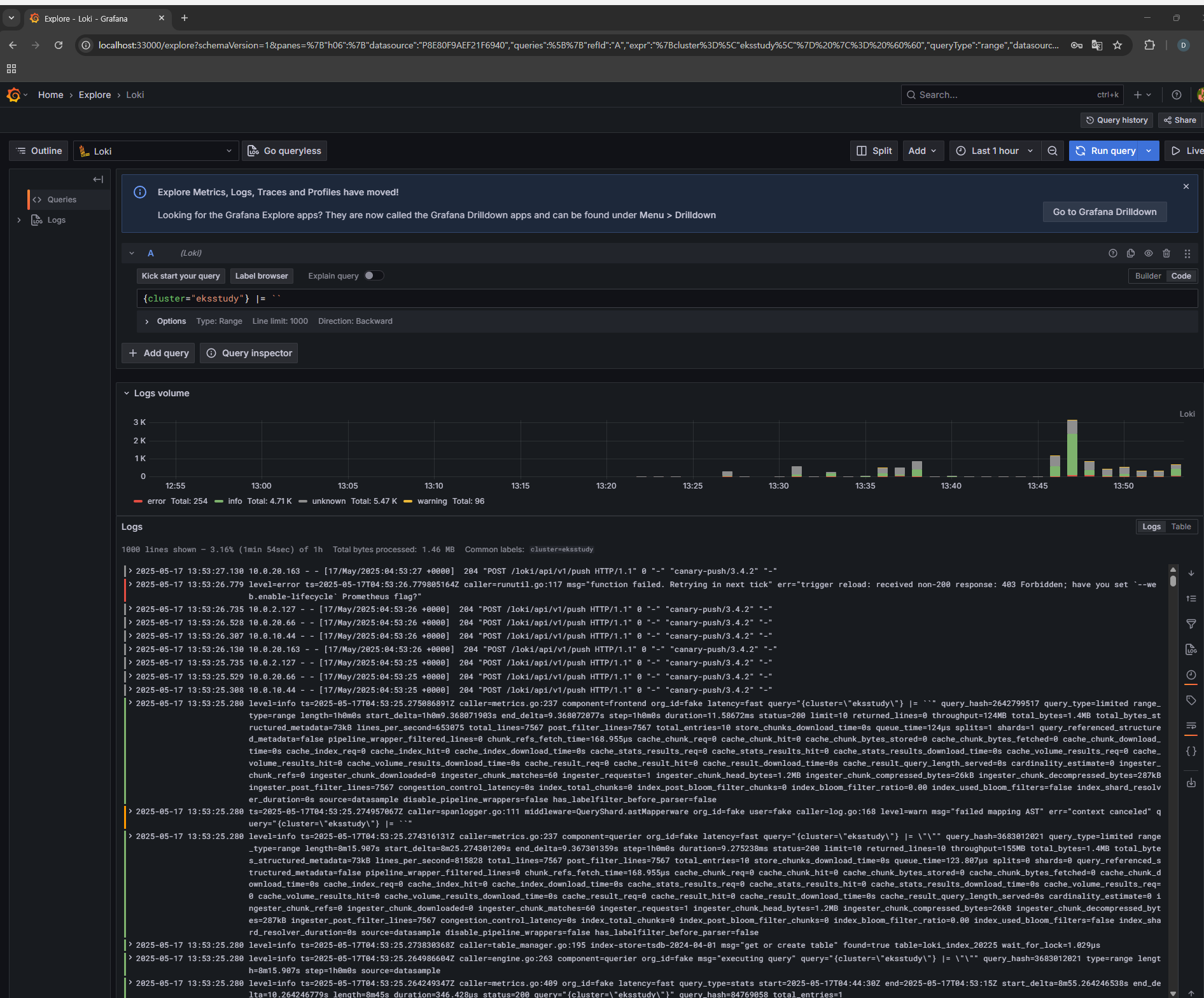
Check the Loki logs:
In Grafana Explore, use the query{cluster="your-cluster-name"}to check that logs are being collected.
Closing Notes
Alloy replaces Promtail and can collect node logs, Pod logs, and cluster events in one place. The Helm chart and config in this post let you set it up quickly. Try it in a test environment, then visualize the logs in a Grafana dashboard.