0. Install aws-cli (link)
1. Install kubectl (link)
2. Install eksctl (link)
3. Create an IAM User for eksctl, Grant Permissions, and Create a Cluster (link)
There are too many permissions to go through, so for now I will proceed by attaching the AWS managed policy AdministratorAccess.
root@elkhost:~# cat cluster.yml
apiVersion: eksctl.io/v1alpha5
kind: ClusterConfig
metadata:
  name: elk-test
  region: ap-southeast-1
nodeGroups:
  - name: ng-1
    instanceType: t3.medium
    desiredCapacity: 2
    volumeSize: 10
root@elkhost:~# eksctl create cluster -f cluster.yml
2022-12-16 19:20:57 [ℹ]  eksctl version 0.122.0
2022-12-16 19:20:57 [ℹ]  using region ap-southeast-1
2022-12-16 19:20:57 [ℹ]  setting availability zones to [ap-southeast-1a ap-southeast-1b ap-southeast-1c]
2022-12-16 19:20:57 [ℹ]  subnets for ap-southeast-1a - public:192.168.0.0/19 private:192.168.96.0/19
2022-12-16 19:20:57 [ℹ]  subnets for ap-southeast-1b - public:192.168.32.0/19 private:192.168.128.0/19
2022-12-16 19:20:57 [ℹ]  subnets for ap-southeast-1c - public:192.168.64.0/19 private:192.168.160.0/19
...
...
2022-12-16 19:38:39 [ℹ]  nodegroup "ng-1" has 2 node(s)
2022-12-16 19:38:39 [ℹ]  node "ip-192-168-61-186.ap-southeast-1.compute.internal" is ready
2022-12-16 19:38:39 [ℹ]  node "ip-192-168-7-191.ap-southeast-1.compute.internal" is ready
2022-12-16 19:38:42 [ℹ]  kubectl command should work with "/root/.kube/config", try 'kubectl get nodes'
2022-12-16 19:38:42 [✔]  EKS cluster "elk-test" in "ap-southeast-1" region is ready
4. ECK Deployment Quick Start (link)
root@elkhost:~#  kubectl create -f https://download.elastic.co/downloads/eck/2.5.0/crds.yaml
customresourcedefinition.apiextensions.k8s.io/agents.agent.k8s.elastic.co created
customresourcedefinition.apiextensions.k8s.io/apmservers.apm.k8s.elastic.co created
customresourcedefinition.apiextensions.k8s.io/beats.beat.k8s.elastic.co created
customresourcedefinition.apiextensions.k8s.io/elasticmapsservers.maps.k8s.elastic.co created
customresourcedefinition.apiextensions.k8s.io/elasticsearchautoscalers.autoscaling.k8s.elastic.co created
customresourcedefinition.apiextensions.k8s.io/elasticsearches.elasticsearch.k8s.elastic.co created
customresourcedefinition.apiextensions.k8s.io/enterprisesearches.enterprisesearch.k8s.elastic.co created
customresourcedefinition.apiextensions.k8s.io/kibanas.kibana.k8s.elastic.co created
root@elkhost:~#  kubectl apply -f https://download.elastic.co/downloads/eck/2.5.0/operator.yaml
namespace/elastic-system created
serviceaccount/elastic-operator created
secret/elastic-webhook-server-cert created
configmap/elastic-operator created
clusterrole.rbac.authorization.k8s.io/elastic-operator created
clusterrole.rbac.authorization.k8s.io/elastic-operator-view created
clusterrole.rbac.authorization.k8s.io/elastic-operator-edit created
clusterrolebinding.rbac.authorization.k8s.io/elastic-operator created
service/elastic-webhook-server created
statefulset.apps/elastic-operator created
validatingwebhookconfiguration.admissionregistration.k8s.io/elastic-webhook.k8s.elastic.co created
5. Create an Amazon EBS CSI Driver IAM Role for the Service Account (link)
root@elkhost:~# eksctl utils associate-iam-oidc-provider --region=ap-southeast-1 --cluster=elk-test --approve
2022-12-17 13:10:05 [ℹ]  will create IAM Open ID Connect provider for cluster "elk-test" in "ap-southeast-1"
2022-12-17 13:10:06 [✔]  created IAM Open ID Connect provider for cluster "elk-test" in "ap-southeast-1"
root@elkhost:~# eksctl create iamserviceaccount --name ebs-csi-controller-sa --namespace kube-system --cluster elk-test --attach-policy-arn arn:aws:iam::aws:policy/service-role/AmazonEBSCSIDriverPolicy --approve --role-only --role-name AmazonEKS_EBS_CSI_DriverRole
2022-12-17 13:10:15 [ℹ]  1 iamserviceaccount (kube-system/ebs-csi-controller-sa) was included (based on the include/exclude rules)
2022-12-17 13:10:15 [!]  serviceaccounts that exist in Kubernetes will be excluded, use --override-existing-serviceaccounts to override
2022-12-17 13:10:15 [ℹ]  1 task: { create IAM role for serviceaccount "kube-system/ebs-csi-controller-sa" }
2022-12-17 13:10:15 [ℹ]  building iamserviceaccount stack "eksctl-elk-test-addon-iamserviceaccount-kube-system-ebs-csi-controller-sa"
2022-12-17 13:10:15 [ℹ]  deploying stack "eksctl-elk-test-addon-iamserviceaccount-kube-system-ebs-csi-controller-sa"
2022-12-17 13:10:16 [ℹ]  waiting for CloudFormation stack "eksctl-elk-test-addon-iamserviceaccount-kube-system-ebs-csi-controller-sa"
6. Manage the Amazon EBS CSI Driver as an Amazon EKS Add-on (link)
root@elkhost:~# eksctl create addon --name aws-ebs-csi-driver --cluster elk-test --service-account-role-arn arn:aws:iam::~~~~:role/AmazonEKS_EBS_CSI_DriverRole --force
2022-12-17 13:22:47 [ℹ]  Kubernetes version "1.23" in use by cluster "elk-test"
2022-12-17 13:22:47 [ℹ]  using provided ServiceAccountRoleARN "arn:aws:iam::~~~~:role/AmazonEKS_EBS_CSI_DriverRole"
2022-12-17 13:22:47 [ℹ]  creating addon
Deploy a Sample Application and Verify That the CSI Driver Works
https://docs.aws.amazon.com/ko_kr/eks/latest/userguide/ebs-sample-app.html
7. Create StorageClass and PersistentVolume Resources
root@elkhost:~# cat stc.yml
kind: StorageClass
apiVersion: storage.k8s.io/v1
metadata:
  name: es-stc
  annotations:
    storageclass.kubernetes.io/is-default-class: "false"
provisioner: kubernetes.io/aws-ebs
parameters:
  type: gp2
  fsType: ext4
root@elkhost:~#
root@elkhost:~#
root@elkhost:~# cat pv.yml
apiVersion: v1
kind: PersistentVolume
metadata:
  name: es-pvv
  namespace: default
spec:
  accessModes:
    - ReadWriteOnce
  awsElasticBlockStore:
    fsType: ext4
    volumeID: aws://ap-southeast-1/vol-~~~~
  capacity:
    storage: 10Gi
  persistentVolumeReclaimPolicy: Delete
  storageClassName: es-stc
root@elkhost:~#
root@elkhost:~#
root@elkhost:~#
root@elkhost:~# kubectl apply -f stc.yml
storageclass.storage.k8s.io/es-stc created
root@elkhost:~# kubectl apply -f pv.yml
persistentvolume/es-pv created
8. Deploy Elasticsearch (link)
root@elkhost:~# cat es.yml
apiVersion: elasticsearch.k8s.elastic.co/v1
kind: Elasticsearch
metadata:
  name: quickstart
spec:
  version: 8.5.3
  nodeSets:
  - name: default
    count: 1
    podTemplate:
      spec:
        containers:
        - name: elasticsearch
          resources:
            requests:
              memory: 2Gi
              cpu: 1
            limits:
              memory: 2Gi
    volumeClaimTemplates:
      - metadata:
          name: elasticsearch-data
        spec:
          accessModes:
            - ReadWriteOnce
          resources:
            requests:
              storage: 10Gi
          storageClassName: es-stc
root@elkhost:~# kubectl apply -f es.yml
elasticsearch.elasticsearch.k8s.elastic.co/quickstart created
root@elkhost:~# kubectl get es --watch
NAME         HEALTH    NODES   VERSION   PHASE             AGE
quickstart   unknown           8.5.3     ApplyingChanges   23s
quickstart   unknown   1       8.5.3     ApplyingChanges   39s
quickstart   unknown   1       8.5.3     ApplyingChanges   42s
quickstart   unknown   1       8.5.3     ApplyingChanges   43s
quickstart   unknown   1       8.5.3     ApplyingChanges   44s
quickstart   green     1       8.5.3     Ready             44s
9. Deploy Kibana (link)
root@elkhost:~# cat kb.yml
apiVersion: kibana.k8s.elastic.co/v1
kind: Kibana
metadata:
  name: quickstart
spec:
  version: 8.5.3
  count: 1
  elasticsearchRef:
    name: quickstart
  config:
    csp.strict: false
  http:
    tls:
      selfSignedCertificate:
        disabled: true
  podTemplate:
    spec:
      containers:
        - name: kibana
          env:
            - name: NODE_OPTIONS
              value: "--max-old-space-size=1024"
          resources:
            requests:
              memory: 0.5Gi
              cpu: 0.5
            limits:
              memory: 1Gi
              cpu: 1
root@elkhost:~# kubectl apply -f kb.yml
kibana.kibana.k8s.elastic.co/quickstart created
root@elkhost:~# kubectl get kb --watch
NAME         HEALTH   NODES   VERSION   AGE
quickstart   red              8.5.3     9s
quickstart   green    1       8.5.3     21s
10. Deploy an Ingress for External Access and Test the Connection
root@elkhost:~# cat ingress.yml
apiVersion: networking.k8s.io/v1
kind: Ingress
metadata:
  name: "kibana-ingress"
  annotations:
    cert-manager.io/cluster-issuer: "letsencrypt-production"
    nginx.ingress.kubernetes.io/ssl-redirect: "true"
    nginx.ingress.kubernetes.io/ssl-passthrough: "true"
spec:
  ingressClassName: nginx
  tls:
    - hosts:
        - <dongdorrong 도메인 주소>
      secretName: kibana-tls
  rules:
    - host: <dongdorrong 도메인 주소>
      http:
        paths:
          - path: /
            pathType: Prefix
            backend:
              service:
                name: quickstart-kb-http
                port:
                  number: 5601
root@elkhost:~# kubectl apply -f ingress.yml
ingress.networking.k8s.io/kibana-ingress created
root@elkhost:~# kubectl get ingress kibana-ingress
NAME             CLASS   HOSTS                           ADDRESS   PORTS     AGE
kibana-ingress   nginx   <dongdorrong 도메인 주소>                   80, 443   18s
root@elkhost:~#
root@elkhost:~#
root@elkhost:~# kubectl get all
NAME                                 READY   STATUS    RESTARTS   AGE
pod/quickstart-es-default-0          1/1     Running   0          7m54s
pod/quickstart-kb-595499cd98-8jzm7   1/1     Running   0          5m49s

NAME                                  TYPE        CLUSTER-IP       EXTERNAL-IP   PORT(S)    AGE
service/kubernetes                    ClusterIP   10.100.0.1       <none>        443/TCP    88m
service/quickstart-es-default         ClusterIP   None             <none>        9200/TCP   7m55s
service/quickstart-es-http            ClusterIP   10.100.241.6     <none>        9200/TCP   7m57s
service/quickstart-es-internal-http   ClusterIP   10.100.109.170   <none>        9200/TCP   7m57s
service/quickstart-es-transport       ClusterIP   None             <none>        9300/TCP   7m57s
service/quickstart-kb-http            ClusterIP   10.100.10.93     <none>        5601/TCP   5m50
To connect a domain through the Ingress, I changed the Kibana Service type from ClusterIP to NodePort and set its External IP to the public IP of the node running the Pod.
root@elkhost:~# kubectl edit svc quickstart-kb-http
kubservice/quickstart-kb-http edited
root@elkhost:~#
root@elkhost:~# kubectl get all
NAME                                 READY   STATUS    RESTARTS   AGE
pod/quickstart-es-default-0          1/1     Running   0          13m
pod/quickstart-kb-595499cd98-8jzm7   1/1     Running   0          11m

NAME                                  TYPE        CLUSTER-IP       EXTERNAL-IP   PORT(S)          AGE
service/kubernetes                    ClusterIP   10.100.0.1       <none>        443/TCP          94m
service/quickstart-es-default         ClusterIP   None             <none>        9200/TCP         13m
service/quickstart-es-http            ClusterIP   10.100.241.6     <none>        9200/TCP         13m
service/quickstart-es-internal-http   ClusterIP   10.100.109.170   <none>        9200/TCP         13m
service/quickstart-es-transport       ClusterIP   None             <none>        9300/TCP         13m
service/quickstart-kb-http            NodePort    10.100.10.93     <none>        5601:31051/TCP   11m
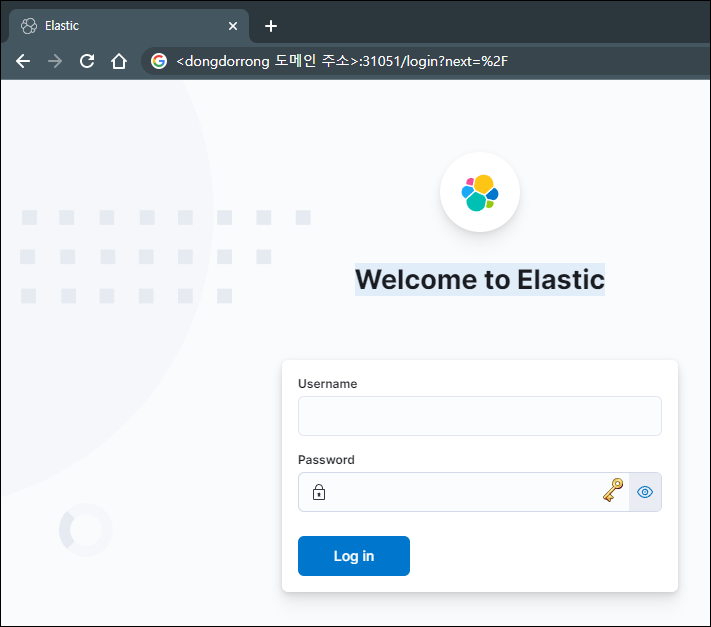
I confirmed that the Service type had changed and NodePort was applied. I added a record in Route 53 for the domain configured in the Ingress and tried accessing it. As shown below, the connection worked.
I wanted to try connecting through the AWS ELB Controller, but it was not easy as someone using EKS for the first time. I should collect these tedious initial setup steps and turn them into Terraform or CloudFormation configurations.
References
https://projectlog-eraser.tistory.com/entry/ELK-K8S-환경에-ELK-stack-배포하기